

How to Store Electronics in a Storage Unit
Yes, electronics can sit in a storage unit for months, and they can come back working if you keep them dry and protected from knocks. Humidity and a hard knock do most of the damage. A stored battery still ages while it sits, and heat speeds that up. This is the method we walk customers through in Calera when TVs, computers, and game consoles are part of a move or a renovation.
Before anything goes in a box
Back up your data first, because the photos and files on a stored laptop are the part you cannot replace. Copy what matters to a drive you keep with you, not in the unit.
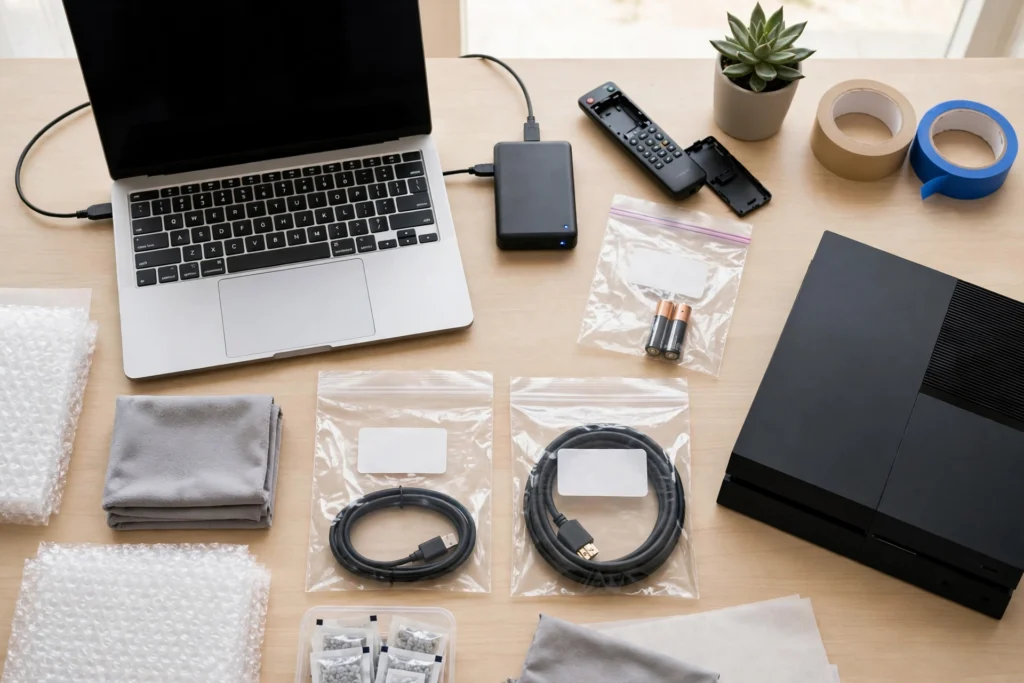
Photograph the back of each device for its serial number, and photograph the cable connections before you unplug anything. Keep the photos on your phone. The serial photos are the record you will want if anything is ever questioned, and the connection photos save the guessing when you set everything up again. Label every cable as it comes off, and keep it in a zip bag marked with the name of its device.
Look inside every player and drive before it gets packed. Take out discs, game cartridges, tapes, USB drives, and memory cards, and put them in their cases. Take the paper out of printers.
Clean each device while it is still out on the desk. Wipe screens and cases with a microfiber or antistatic cloth. Clear dust from vents, ports, and fans with compressed air or a soft brush. Keep liquids off the devices, and never spray cleaner directly onto one. Dust packed into a vent before the box is sealed stays there for the whole stay.
Take removable batteries out of the devices that use them. Remotes, clocks, handheld consoles, and flashlights are the usual ones. Batteries leak when they sit unused, and a leaking battery ruins the device around it. Put the removed batteries in a labeled bag and keep them with you, or store them separately in a cool, dry spot, away from metal objects. Never store a swollen or damaged battery, and never charge one. That battery goes to a recycling drop-off, not into a box.
The batteries built into most laptops, phones, and tablets cannot come out. Power those devices fully off and store them at about half charge. Microsoft puts the storage range at 40 to 60 percent, because a battery stored empty can drain too far to recover, and a battery stored full loses capacity faster. The regular checks later in this guide include topping that charge back up toward half on a long stay.
Check the owner’s manual for any storage instruction written for your model. Where the manual gives a rule for your device, follow the manual. That applies to the battery guidance above and to printers in particular.
How to pack each kind of device
TVs
Let a TV cool down after you unplug it before you pack it. A TV always travels and stores upright, the way it stands on its stand. Laying a flat screen face down puts the whole weight of the panel on the glass, and screens crack under far less weight than people expect. If you still have the original box, use it. The molded foam inside was made for exactly this shape. If the box is gone, lay a foam sheet or a soft cloth against the screen first, then wrap the TV in a moving blanket and slide it into a TV box that fits without forcing it, with padding filling the gaps. Keep bubble wrap and plastic film off the screen itself. Mark the box with the screen side and an arrow. Monitors follow the same rules as TVs.

Computers and laptops
A desktop tower rides upright, with the side panel facing up if the case has a heavy cooler inside. Wrap it in a blanket or a thick towel before it goes in a box, and fill the gaps so it cannot slide. If you take a hard drive or another loose component out for a long stay, it goes in an anti-static bag. Keep anti-static material against bare components where you can, because ordinary bubble wrap can carry static. Use the bubble wrap as outer cushioning instead. Laptops travel in a padded sleeve, inside a box, with nothing heavy on top. Close them, do not stack books or hardware on them, and keep the charger in the labeled cable bag. A laptop’s built-in battery follows the half-charge rule in the preparation section above.
Consoles, speakers, and small devices
Small devices do best in their original boxes. The inserts hold them still, which is the whole job. Without the original box, wrap each item on its own, pack it snug with paper so it cannot move, and put a silica packet in the box. Stand speakers upright, and pad around their knobs and switches, which are the parts most likely to snap in a move. Keep remotes and controllers with the device they belong to, not loose in a mixed box.
Whatever the device, a silica gel packet goes into its box before the box is sealed. The packet takes up the small amount of moisture that finds its way into a closed box during the stay.
What about temperature and humidity?
This is the honest part. Brushy Creek Storage offers standard storage units, not climate-controlled storage. A standard unit follows the weather outside, and no packing method changes that. Electronics prefer stable, dry conditions, and an Oklahoma summer is humid, so a long stay through the summer is the hard case for this method.
For a short household move in mild weather, the steps in this guide reduce the avoidable risks. Devices go in clean and dry, silica sits in the boxes, the boxes sit raised off the concrete, and you check them every month or two. Those steps reduce risk. They do not control the temperature or the humidity inside the unit.
Some gear should not ride out a long, hot stay in a standard unit. Rare or irreplaceable electronics belong in a controlled environment. Equipment a business cannot afford to lose belongs there too.
Setting up the unit for electronics
Keep the boxes off the concrete on a pallet or a low shelf. Concrete sweats when temperatures change, and a box sitting directly on it absorbs that moisture from below even when the unit feels dry.
Put the electronics boxes toward the back of the unit, away from the door, where the temperature swings are smallest. Leave a little space between the boxes so air can move around them, rather than packing them tight against each other.

Put nothing heavy on top of electronics boxes. Mark them clearly so nobody stacks a box of books on the TV box later. Leave a small gap between the stacks and the unit walls, which can run cooler and damper than the middle of the unit.
Check the boxes when you visit. Every month or two, open one or two and look for damp cardboard or a musty smell. Checking on that rhythm gives you a chance to catch a problem while it is still small. Swap in fresh silica packets when the old ones have taken up moisture. On the same visit, check the charge on any device with a built-in battery, and top it back up toward half if it has dropped.
Protecting gear that has real value
Electronics are also the items people most often under-protect. A TV, a laptop, and a console together are easy to undercount when you add up what they would cost to replace. Make the inventory list before you pack, with the serial photos from the first step, and look at our tenant protection plan before the boxes go in. The plan covers the stored value of what you keep in the unit, and the lease addendum carries the details and limits. Electronics are exactly the kind of property people forget to account for until something goes wrong.
If the gear belongs to a business, office computers, monitors, or stock, the same method applies at a larger scale. Our business storage page covers units for inventory and equipment, and the packing rules do not change.
For the security side, gated access, individual entry codes, and video surveillance, our security guide explains what each of those means in practice.
Before you turn electronics back on
When the stay is over, let each device reach room temperature before you plug it in or switch it on. Moisture can condense on cold internal parts when a device comes into warmer air, and powering a device while that moisture is still inside it is how stored electronics get damaged at the last step. Give the device several hours, and longer if it still feels cold to the touch. Before you use it, look for damp, corrosion on the connectors, or a battery that has swollen. A device with a built-in battery may need a charge before it starts. That is normal after months of sitting.
Quick reference
| Device | The one rule that matters |
|---|---|
| TV | Always upright, never flat, screen protected |
| Monitor | Same rules as a TV: upright, screen protected |
| Desktop computer | Upright, padded, nothing stacked on it |
| Laptop | Padded sleeve, closed, charger in the labeled bag |
| Phone or tablet | Powered off, built-in battery at about half charge |
| Consoles and small devices | Original box or wrapped snug, silica packet inside |
| Printer | Paper out, cartridges and tanks per the manufacturer’s instructions |
| Camera | Cleaned per its care guidance, removable batteries out, padded case |
| External drive | Anti-static bag, and the backup copy stays with you |
| Batteries | Removable ones out and stored separately; built-in ones off at about half charge; never a swollen battery |
Questions people ask
Can electronics stay in a non-climate unit?
For a short household move in mild weather, yes, with dry packing and regular checks. A standard unit does not control temperature or humidity, so a long stay through hot, humid weather carries more risk. For rare or irreplaceable gear, a controlled environment is the lower-risk home.
Should I leave batteries in stored devices?
No, for removable batteries. Take them out, because a leaking battery damages the device around it and you will not notice until you unpack. Batteries built into a laptop, phone, or tablet cannot come out. Power those devices off and store them at about half charge instead.
Can I stack boxes on top of a TV box?
No. Screens crack under weight that looks harmless. Mark the box clearly and keep it on top of its stack.
Do I need extra protection for expensive gear?
Write down the inventory with serial photos, and look at the tenant protection plan before the boxes go in. The plan covers the stored value of what you store, and the lease addendum carries the details and limits.
The short version
Back up the data, take the removable batteries out and set the built-in ones at half charge, pack each device in its own padded box, keep the boxes off the concrete, and check them every month or two. That is the whole method.
If the electronics are part of a bigger move, the rest of the load follows the same care. Mattresses go in flat and dry, and our guide on how to pack a storage unit covers the small-box method for everything else.
If you are planning a move around Calera, Durant, or Colbert and the electronics are part of the load, call us at (580) 434-8269. Tenant access runs 6 AM to 9 PM every day.


